Learning to drive from the camera
In tutorial 1 the robot was told exactly where it was. Now it gets nothing but the picture from its own front camera: no position, no map, no speed. From those pictures alone the Ackermann car learns to drive the ε track as fast as it can without leaving it. Everything runs on your own PC; count on about an hour of training.
1The goal
The robot is the Ackermann car: a drive motor on the rear wheels and a steering servo for the front wheels, like a real car. The course is the ε track: a 42.6 m loop behind the start square with bends both ways and small hills. A lap counts when the car is back at the chequered line; leaving the painted band ends the attempt.
The network ends up faster than the line follower, even though that one knows its exact position. The line follower sticks to the centre line; the network found out that it may cut the bends inside the band, which makes the lap shorter.
2What you need
The same as in tutorial 1: the robotSimulatorAPI repository, Node.js 22+, Chrome and Python 3.10+ with
pip install stable-baselines3 gymnasium pillow
The script for this tutorial is python/track_vision_rl.py.
Learning from images is heavier than learning from 10 numbers: a GPU helps here (see
training speed), but a modern laptop CPU does it too.
node server.mjs                                     # terminal 1: the simulators
python python/track_vision_rl.py baseline         # terminal 2
python python/track_vision_rl.py train
python python/track_vision_rl.py eval
python python/track_vision_rl.py watch --gif lap.gif3The track and the camera
Every Botopia robot has a small camera at its front; in the simulators you see its picture in the top
right corner of the 3D view. Through the API you get that picture with view: "robot".
The ε track is painted to be seen: a light band, white edge lines and a dashed centre line on a dark
floor. The top row below is the camera at full size, the bottom row is what the network gets.
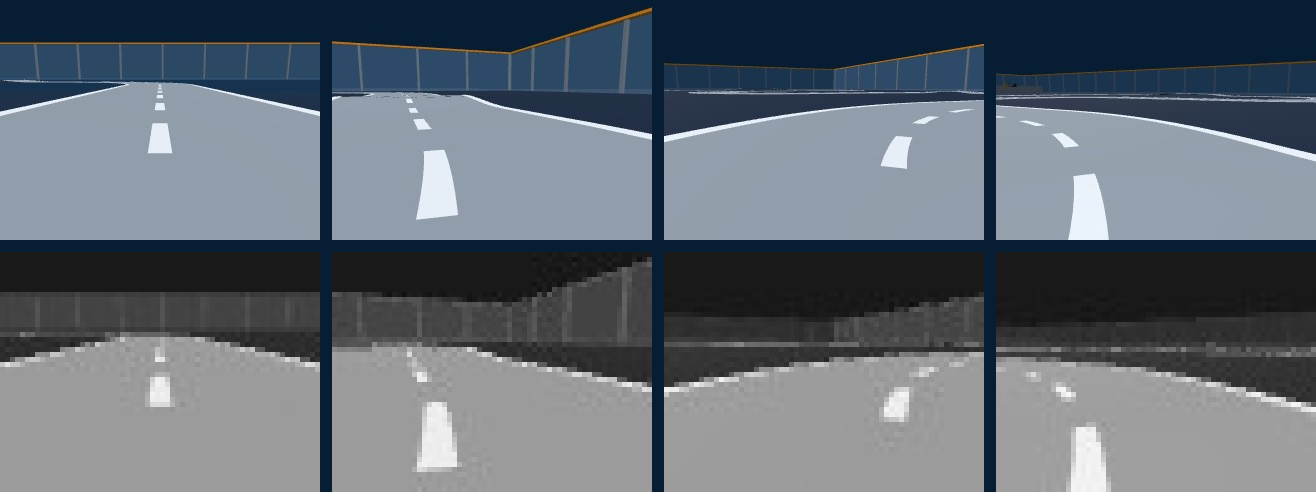
The camera picture shows only what a real camera would see: the path trail, the turning circle and other helper drawings of the simulator are left out, and so are shadows (they cost a lot of drawing time and add nothing for the track).
4From pixels to an observation
One step = the action, 0.1 s of simulation, and the new camera image, all in one API call.
The image option makes the server add the JPEG to the step's answer; with eight simulators
in one batch call that is eight images per call:
IMAGE = {"view": "robot", "width": 64, "quality": 0.9}
results = api.step_many([{"id": d.id, "action": d.command(a), "dt": 0.1, "image": IMAGE}
                         for d, a in zip(drivers, actions)])

def to_gray(jpeg):                                 # JPEG bytes → (48, 64, 1) numbers 0 … 255
    return np.asarray(Image.open(io.BytesIO(jpeg)).convert("L"), dtype=np.uint8)[:, :, None]
Grey, 64 × 48. Colour adds little on this track and small images train much faster.
Three images stacked. One picture shows where the car is, not how fast it moves or which
way it is turning. The last three pictures together do (the dashes move between them), so the
observation is a 48 × 64 × 3 block: VecFrameStack(venv, 3).
5Actions, reward, attempts
Action: throttle and steering
Two numbers −1 … 1 from the network. The throttle is mapped to 25 … 100 % (the car never stands
still, so it can't learn to “win” by not moving), steering goes straight to the car's turn.
Reward per step
reward = 10 × (metres gained along the track)
       − 0.05                  # every 0.1 s costs a little
       − 10                    # when it leaves the band, and the attempt ends
“Metres along the track” comes from the simulator (progress.distance); the network never sees
it, it only feels it through the reward. Faster driving earns more per second, leaving the band costs a lot
and ends all future reward: that balance is what makes it fast and careful.
Attempts start anywhere
Every attempt starts at a random spot on the track (reset(start=…)) and lasts at most 30 s.
Always starting at the line, the car would see the first bends a thousand times and the last ones hardly
ever.
6The network
CnnPolicy uses the convolutional network from DeepMind's Atari work (“NatureCNN”): three
layers of small filters that slide over the image and learn to react to edges, lines and their direction,
then a layer of 512 numbers that describes the picture, and from there two small outputs:
- the actor: throttle and steering (plus how much it still experiments around them);
- the critic: how much reward it expects from here, used to judge whether an action was better or worse than expected.
About 340 000 weights (actor and critic share the image layers), all learned from the reward. Nobody tells the network what an edge line is.
7The time to beat
The benchmark cheats on purpose: it reads its distance to the centre line from the simulator
(progress.offset) and steers against it, at a fixed throttle.
python python/track_vision_rl.py baseline
Line follower (knows its offset), throttle 0.6: lap in 67.8 s (63 cm/s), left the band 0 times
Line follower (knows its offset), throttle 1.0: lap in 50.0 s (85 cm/s), left the band 0 times8Train
python python/track_vision_rl.py train
...
  new best mean reward 141.8: saved track_vision_ppo_best.zip
Saved track_vision_ppo.zip after 48.7 min of training
The heart of it:
venv = VecFrameStack(VecMonitor(make_vec_env(8, "ackermann", url)), 3, channels_order="last")
model = PPO("CnnPolicy", venv, n_steps=256, batch_size=256, n_epochs=4,
            learning_rate=lambda remaining: 1e-4 * remaining,   # goes down to 0
            target_kl=0.03,                                   # stop an update that changes too much
            gamma=0.98, ent_coef=0.005, device="auto")
model.learn(total_timesteps=400_000, callback=KeepBest("track_vision_ppo_best.zip"))| Steps | ep_rew_mean | ep_len_mean | What is happening |
|---|---|---|---|
| 50 000 | 58 | 131 | follows the band on straights, loses it in bends |
| 100 000 | 76 | 140 | takes most bends |
| 200 000 | 104 | 171 | a first full lap: 53.2 s |
| 300 000 | 141 | 233 | rarely leaves the band any more |
| 400 000 | 126 | 187 | drives faster and more boldly: lap 46.6 s |
The training reward is 10 × the metres driven in an attempt of at most 30 s, minus penalties. It went down a
little at the end, yet the final model drives the fastest lap. During training the network still adds
random variation to its actions (to keep exploring), and at a higher speed that variation makes it slip off
the band now and then. The test lap uses the actions without variation (deterministic=True).
So test the final model and track_vision_ppo_best.zip: the best training reward is not
always the best lap.
9When training collapses
Our first run used a 2.5 × higher learning rate and no target_kl. It learned faster, and then,
at 300 000 steps, it forgot nearly everything within a few minutes:
The log showed why. PPO measures how much each update changes the policy: approx_kl. Healthy values
are around 0.01. The first run averaged 0.047 with peaks of 0.28, and up to
60 % of its samples were clipped (clip_fraction). Most of those big jumps happened to go well, until
one didn't: the car started leaving the band, the new experience was bad, and the next updates made it worse.
- Smaller learning rate (1e-4) that goes down to 0 by the end: the run above averaged 0.008.
target_kl=0.03: PPO stops an update as soon as it would change the policy more than that.- Keep the best model:
KeepBestsaves the model whenever the average reward beats its record, so even a run that goes wrong leaves its best version behind.
Watch approx_kl and clip_fraction in the log. If approx_kl stays
well above 0.02, lower the learning rate before you lose a long training run.
10Test and watch
python python/track_vision_rl.py eval
PPO from the camera, lap 1: lap in 46.6 s (91 cm/s), left the band 0 times
PPO from the camera, lap 2: lap in 46.6 s (91 cm/s), left the band 0 times
python python/track_vision_rl.py eval --model track_vision_ppo_best.zip
PPO from the camera, lap 1: lap in 49.8 s (86 cm/s), left the band 0 times

# one lap as a GIF: the 3D view with the network's 64 × 48 picture in the corner
python python/track_vision_rl.py watch --gif lap.gif
# or live, in a visible Chrome:  node server.mjs --show   then   ... watch
A test lap starts at the chequered line, uses the same three-image stack as in training, and stops after one full lap or 3 minutes.
# slower: the network's throttle × 0.6 (it still chooses its own speed in every bend)
python python/track_vision_rl.py watch --speed 0.6
PPO from the camera: lap in 74.7 s (57 cm/s), left the band 0 times
# the same lap in slow motion (only how you watch it, not how it drives)
python python/track_vision_rl.py watch --playback 0.511Going faster
The Ackermann car has a top speed of 0.9 m/s. Give it a stronger motor (in the simulator: --vmax, or the
Top speed slider on its page) and see what the
network does with it. Here: twice as fast, 1.8 m/s.
Step 1 · a faster car, the same network
python python/track_vision_rl.py eval --vmax 1.3
python python/track_vision_rl.py eval --vmax 1.8
The model trained at 0.9 m/s steers too late for a faster car:
| Top speed | Line follower (knows its offset) | Model trained at 0.9 m/s |
|---|---|---|
| 0.9 m/s | 50.0 s | 46.6 s, clean |
| 1.1 m/s | 40.9 s | 39.1 s, clean |
| 1.3 m/s | 34.6 s | 30.7 s, left the band once |
| 1.8 m/s | 25.0 s | 25.7 s, left the band 5 times |
Step 2 · train at the new speed, and watch it slow down
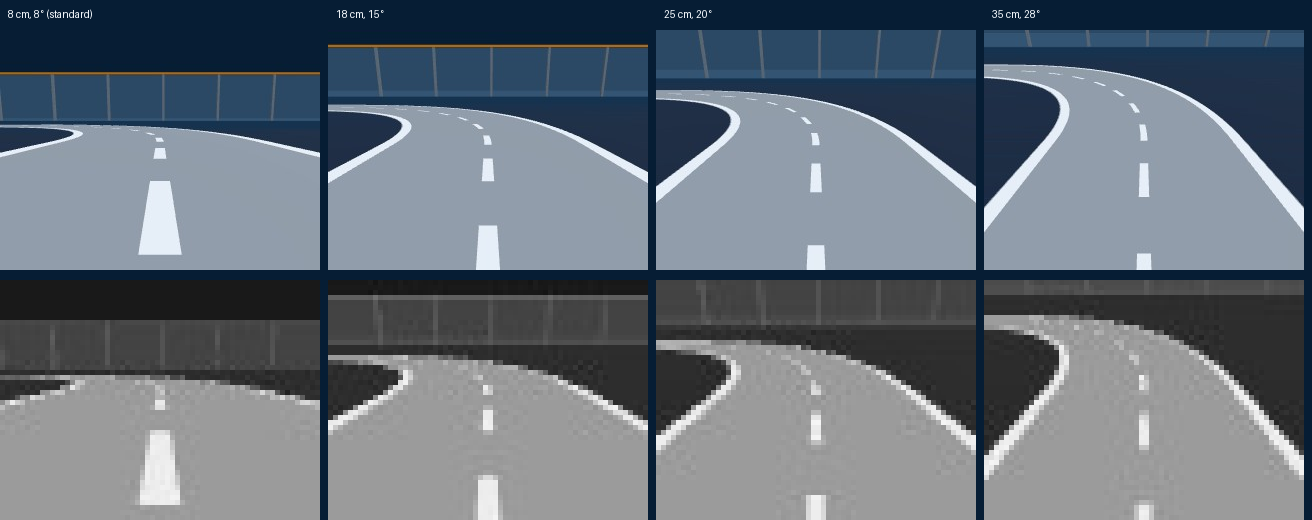
python python/track_vision_rl.py train --vmax 1.8 --model fast.zipThe result drove clean laps, but in 58.7 s: slower than the original model. Fine-tuning the 0.9 m/s model step by step (1.3, then 1.5 m/s) gave the same picture: whatever the top speed, the network settled at about 0.9 m/s. It had found out that slowing down is the safe answer. Why? The camera sits 8 cm above the floor and sees about a metre of track: at 1.7 m/s a bend appears less than a second before the car is in it.
Step 3 · let it see further ahead
Self-driving model cars put their camera on a mast, tilted down. The Ackermann page can do the same:
--camh (height in metres) and --camtilt (degrees down), or
indexAckermann.php?camh=0.3&camtilt=24 in the browser.
# 1. train from scratch with the high camera at the new speed (about 25 minutes)
python python/track_vision_rl.py train --vmax 1.8 --camh 0.3 --camtilt 24 --model fast_cam.zip
# 2. keep training from its best version (fine-tuning, --init), with a smaller learning rate
python python/track_vision_rl.py train --vmax 1.8 --camh 0.3 --camtilt 24 --init fast_cam_best.zip --model fast_cam2.zip
# test and watch with the same car and camera it was trained with
python python/track_vision_rl.py eval  --vmax 1.8 --camh 0.3 --camtilt 24 --model fast_cam2.zip
python python/track_vision_rl.py watch --vmax 1.8 --camh 0.3 --camtilt 24 --model fast_cam2.zip| At a top speed of 1.8 m/s | Lap | Left the band |
|---|---|---|
| Low camera, trained at 1.8 m/s | 58.7 s | 0 |
| High camera, trained at 1.8 m/s (400 000 steps) | 39.5 s | 0 |
| High camera, + 400 000 steps fine-tuning | 29.5 s (144 cm/s) | 0 |
| Line follower that knows its offset | 25.0 s | 0 |
The lesson: no learning rate or reward setting made the car faster; giving it a better
view did. Before tuning the training, check what the robot can actually see. A model only works with the car and camera
it was trained with: always pass the same --vmax, --camh and --camtilt to
eval and watch.
12Training speed and the GPU
On the laptop we used (16 CPU cores, RTX 5070), the network on the CPU trained at 100–140 steps per second: 400 000 steps in 49 minutes. Where does the time go?
| Part | Cost | What helps |
|---|---|---|
| Simulating 0.1 s | 0.3 ms | (nothing needed) |
| Drawing the 64 × 48 camera image (in Chrome, in software) | ~3.5 ms | small images; --browsers on the server: several Chrome instances draw in parallel |
| The network: choosing actions and learning | large part on a CPU | a GPU: --device cuda |
Unlike tutorial 1, a GPU pays off here: a convolutional network on images is exactly what GPUs are for. Install
the CUDA build of PyTorch (RTX 50 series: CUDA 12.8 or newer, see
pytorch.org) and train with --device cuda;
--device auto (the default) already picks the GPU when PyTorch sees one.
pip uninstall torch
pip install torch --index-url https://download.pytorch.org/whl/cu128
python python/track_vision_rl.py train --device cuda
The script limits PyTorch to 4 CPU threads: with all 16 it competed with the Chrome tabs that run the simulators, and training became three times slower.
13Experiments
| Try | How | What to look for |
|---|---|---|
| Another robot | --robot skid, 4wd, tracked |
Its camera sits at another height, it turns differently. Run baseline first. |
| Fewer images in the stack | --stack 1 | Without motion in the observation, can it still choose its speed? |
| Colour, or bigger images | W, H and to_gray in the script | Slower training: does it learn more? |
| No minimum throttle | Driver(..., min_throttle=0) | Does it learn to creep, or to stand still? |
| More time pressure | Driver(..., time_penalty=0.2) | Faster laps, or more crashes? |
| Longer training | --steps 800000 | Does the lap time keep dropping? |
| Even faster | --vmax 2.5 --camh 0.4 --camtilt 30 |
See going faster: how far can the camera trick take it? Beat the line follower's 25 s. |
Next: tutorial 3 splits the job in two: a YOLO segmentation model finds the path, a small policy steers from that mask.
Challenge: a clean lap under 45 s, from the camera only. And a harder one:
train on the Ackermann, then test the same model on the 4WD robot (eval --robot 4wd). Does what it
learned carry over to another car?
14Troubleshooting
| Problem | Solution |
|---|---|
ConnectionRefusedError | Start node server.mjs first and leave it running. |
| Training much slower than here | Server started with --show? Restart without. Try --browsers 2 or 4 on the server, fewer --envs on a PC with few cores, or a GPU. |
| The reward rises and then crashes | See when training collapses; use track_vision_ppo_best.zip. |
No trained model | Run train first, and eval / watch from the same folder. |
| Results differ from this page | Normal: another PC, another PyTorch version and the random exploration all change the run. Train longer or test the _best model. |